I Built an AI Second Brain That Remembers My Business. Here's Why It Went Out of Control.
 Sachintha Gamage··17 min read
Originally published on sprintcodelabs.com.
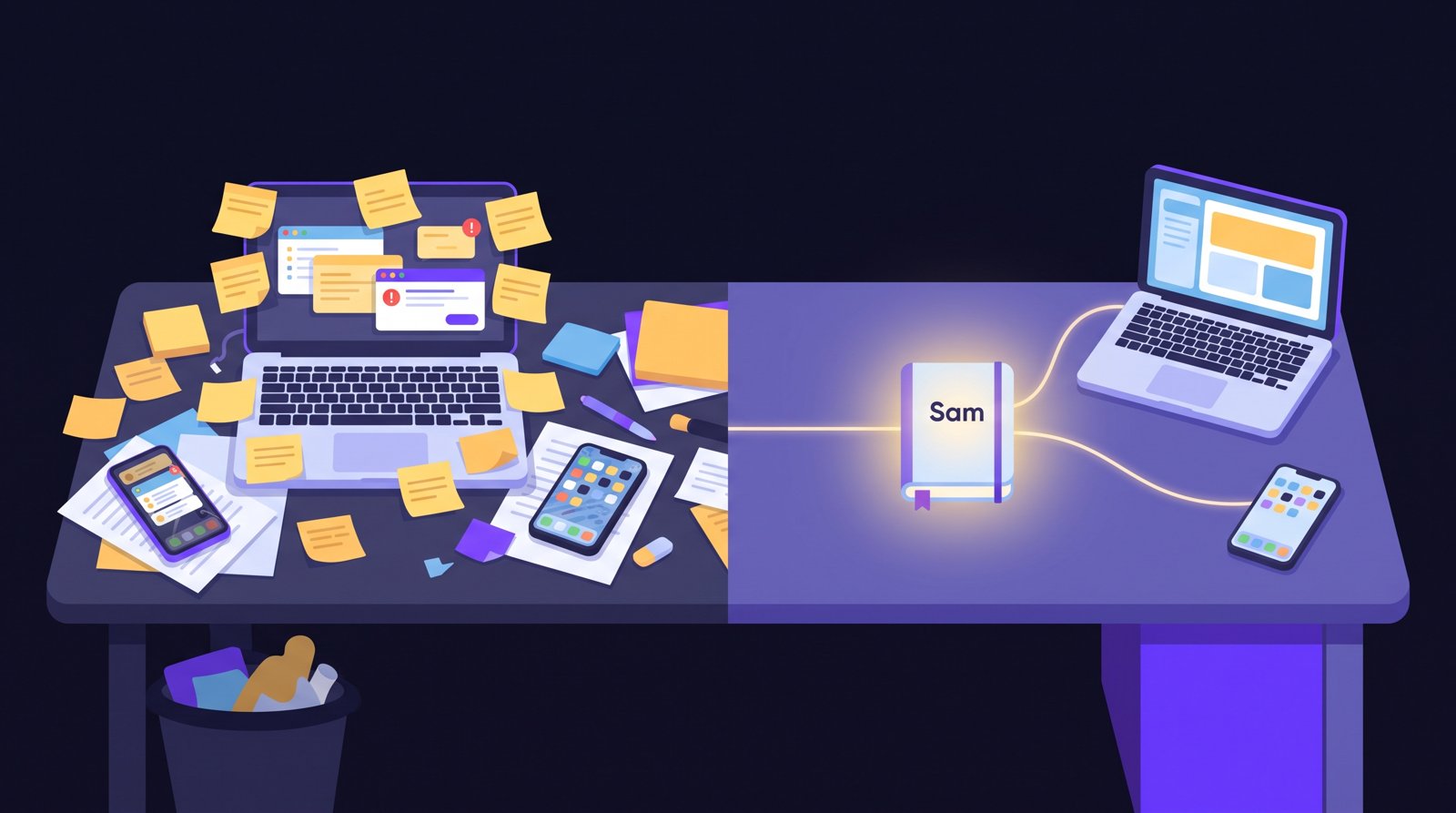
It’s 9:00 AM on a Monday. A developer is stuck on a bug.
A year ago, I would have opened a chat window, typed “Okay, so, let me explain who everyone is again…”, and spent ten minutes briefing an AI before it could help with anything.
Today I type one line. Or I just talk. And the thing on the other end already knows who the client is, who my team members are, where the project is deployed, what we promised them, and which invoice is overdue.
This post is about how I built that. It’s long, because I want to show you the whole thing: the memory, the skills, the daily routine, and the part most people skip, which is everything I did to make sure it can’t hurt me.

I’ll also tell you about two times it tried.
1. The real problem isn’t more intelligent AI models. It’s relevant context.
When you use ChatGPT, Gemini or Claude in a browser tab, you have an unspoken job: you are the context manager.
The model is smart, but it only knows what is in front of it right now. It doesn’t know your business, your clients, your team, your rules, or what you decided last Tuesday. You re-explain. You attach the same document for the fifth time.
Think about what a good human assistant does. They don’t ask “who is Priya?” every morning. They remember. And when you ask them a question, they quietly decide which of the hundred things they know actually matters for this question, and bring only that to the table.
That second part is the one people miss. It isn’t just about remembering. It’s about choosing the right context at the right moment. The right moment matters as much as the right fact. The same detail that saves the day at one point in a task is just noise at the next.
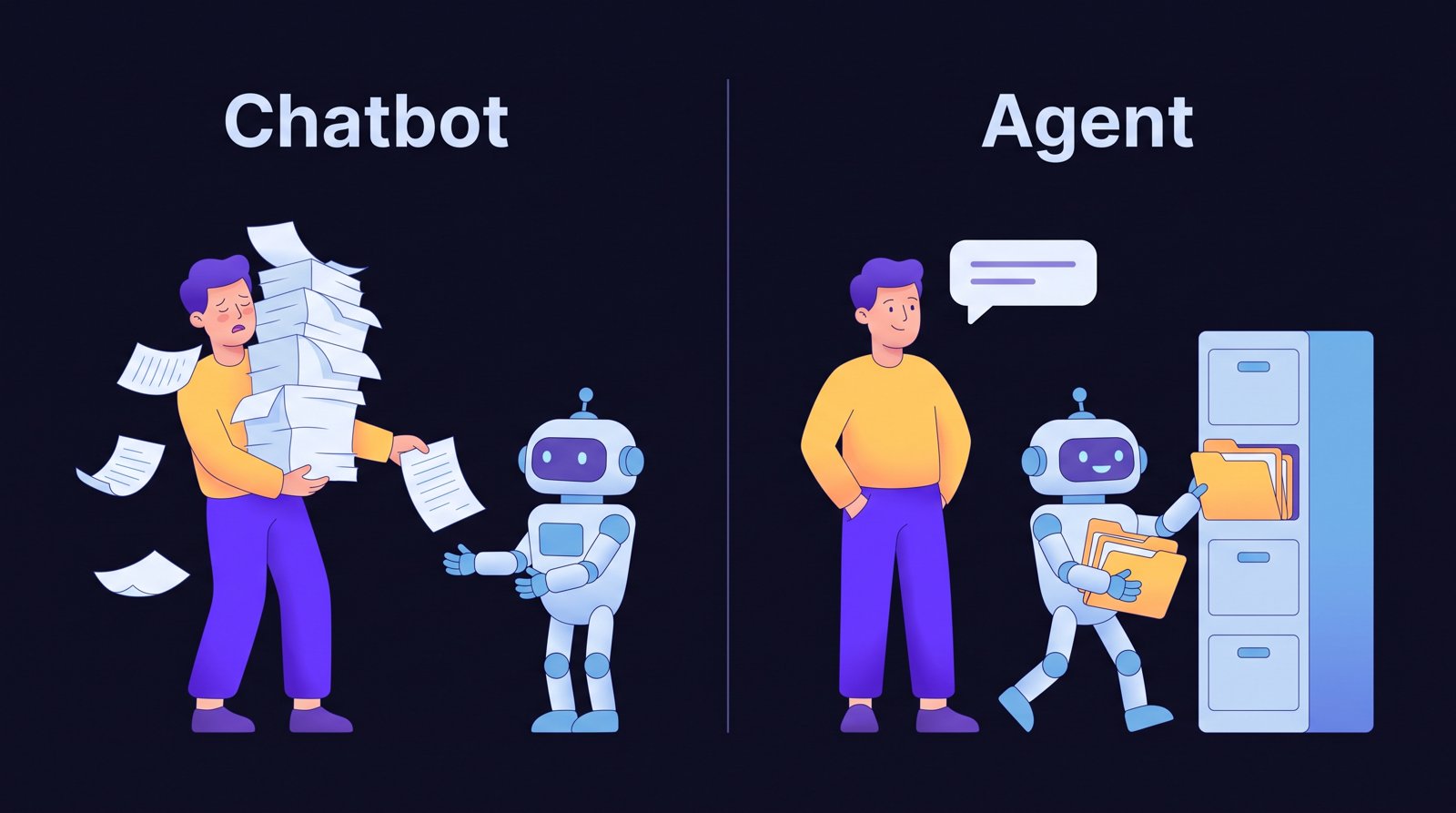
Who decides what the model sees?
2. What I mean by “agent”
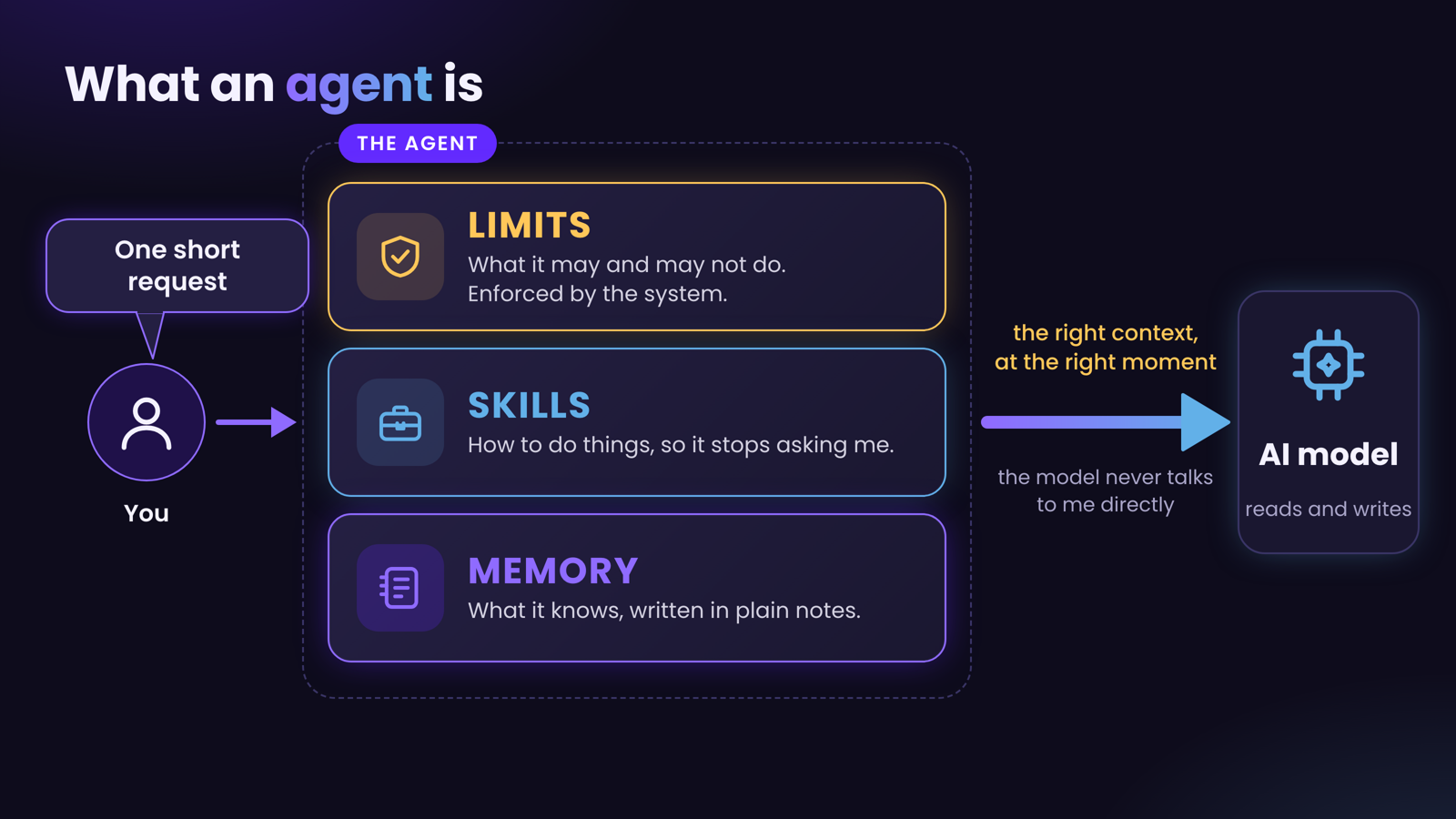
- Memory. A place to write things down and look them up, so it can decide what context to hand to the model.
- Skills. Ready-made ways of doing things, so it stops asking you how to do them.
- Limits. A clear set of things it is allowed and not allowed to do, enforced by the system, not just requested politely.
Most of the “AI assistant” demos you see are strong on the first two and silent on the third. That’s the part that matters most once the assistant has real access to real things. We’ll get there.
I call mine Sam. It lives in a folder on my computer and on a small always-on server. Under the hood it’s a coding-capable AI agent pointed at a folder of notes, with a set of tools and rules around it. Nothing exotic.
The value is in how the pieces fit together.
3. Layer one: memory is just a folder of notes
Many people overcomplicate this with vector databases, graph databases and so on. Each of them has its advantages, but for a personal assistant, that is too much. It’s over-engineered.
Here is the surprising part. My assistant’s memory isn’t any of those. It’s a folder of plain text files, one page per person, project or topic. The agent reads and edits them.
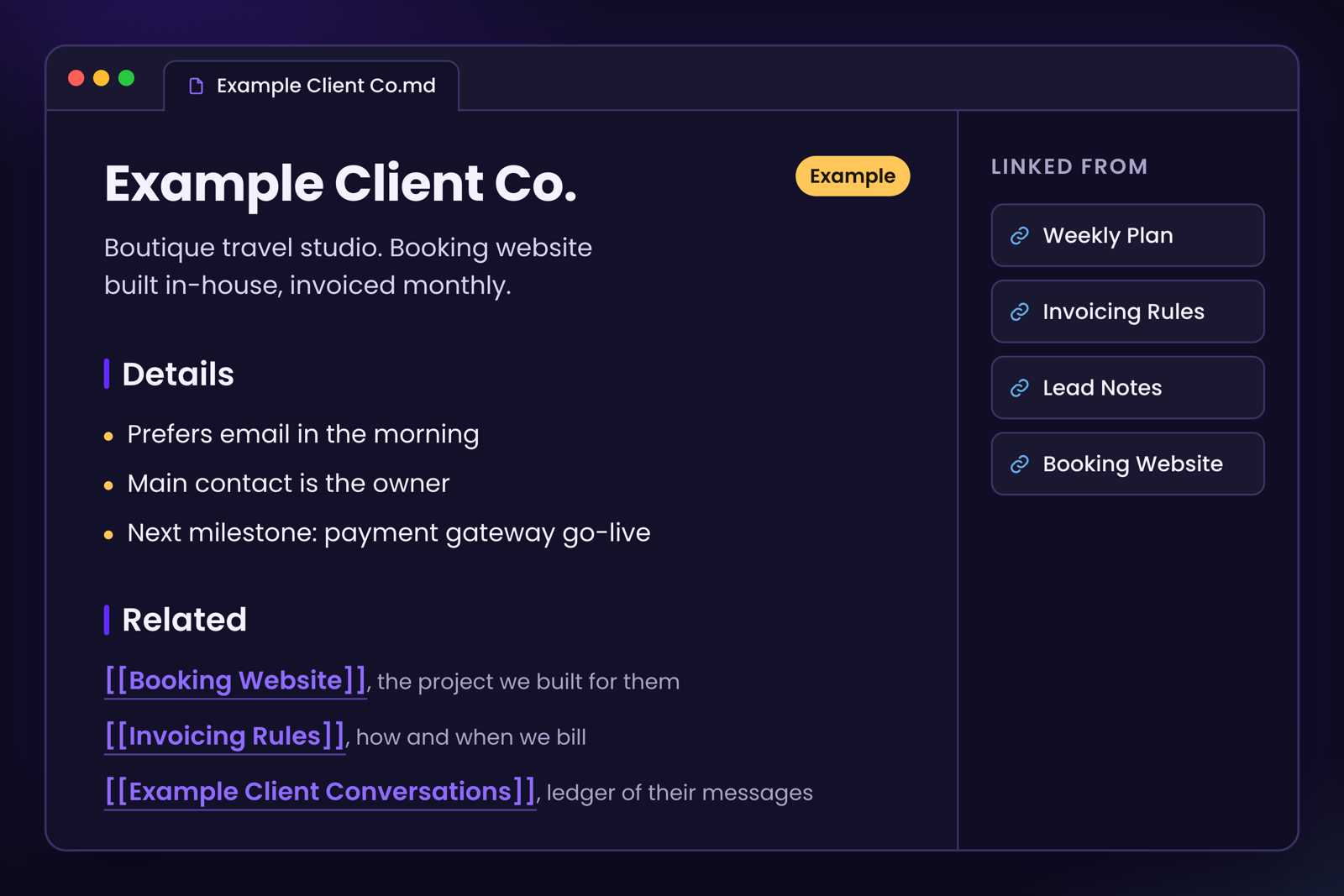
A page looks like this:
- A short summary of what the thing is.
- The details, organised sensibly.
- A “Related” list linking to other pages, each with a reason.
The pages are small on purpose. A short page about one client, linked to a short page about their project, linked to a page about how we invoice them, beats one giant document.
Facts get found by following links, the same way you’d explore Wikipedia, not by scrolling.
The AI does the filing. This is the part that changed my life. When I mention something in conversation (a phone number, a decision, a preference), it files the fact in the right page. It doesn’t announce it. It doesn’t ask “would you like me to save this?” It just does it. By the end of a week, the notes know more about my business than I can hold in my head.
If it needs a fact, it searches the notes first. If the answer isn’t there, it says so plainly instead of guessing. That one rule kills most of the “confident nonsense” problem. An assistant that says “I checked, it’s not in the notes” is far more useful than one that makes something up.
Not only that, there’s a journal. Every day gets a short entry: what we discussed, what we decided, what changed. So next month I can ask “what did we decide about that on the 12th?” and get an actual answer. The journal gives the agent a sense of time. Without it, the notes are just a pile of notes.
There’s a rulebook. One file describes how the notes are organised, when to make a new page, when to split a page, how to link. It’s the schema for the whole brain, and it evolves.
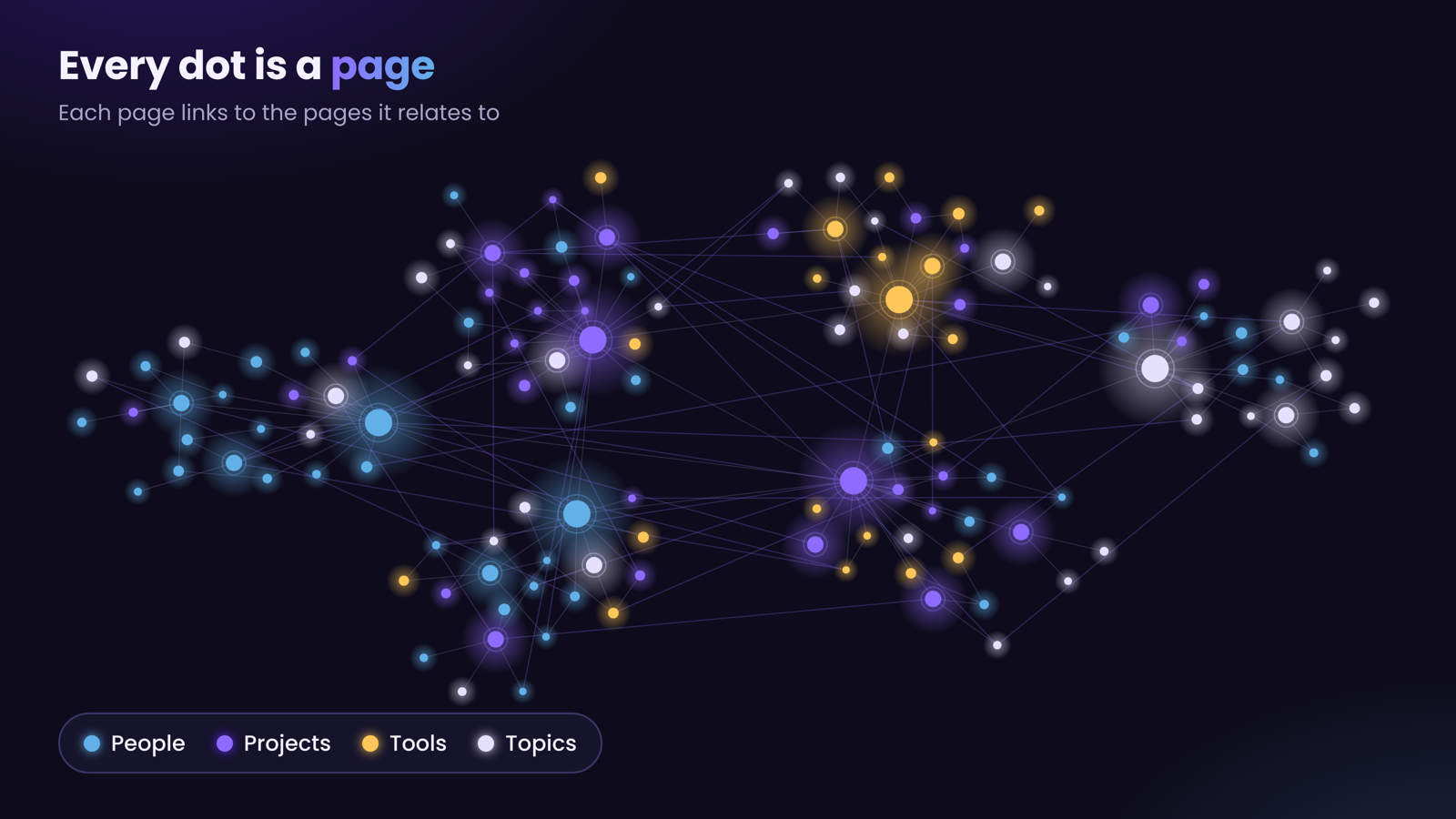
Every dot is a page. Every line is a link someone, or something, decided was worth making.
Short, linked, boring on purpose.
4. Layer two: skills, so it stops asking me
Memory tells the agent what it knows. Skills tell it what it can do.
A skill is a written-down procedure the agent loads when it’s relevant. “How to raise an invoice.” “How to contact a client to ask follow-up questions.” “How to follow up with a client when an invoice is past due.” “How to run the entire payroll.”
Without skills, every task starts with the agent asking me questions: which tool, which format, who do I send this to, what tone? With skills, it already knows, because I explained it once and wrote it down. I only get asked about things that are genuinely my call.
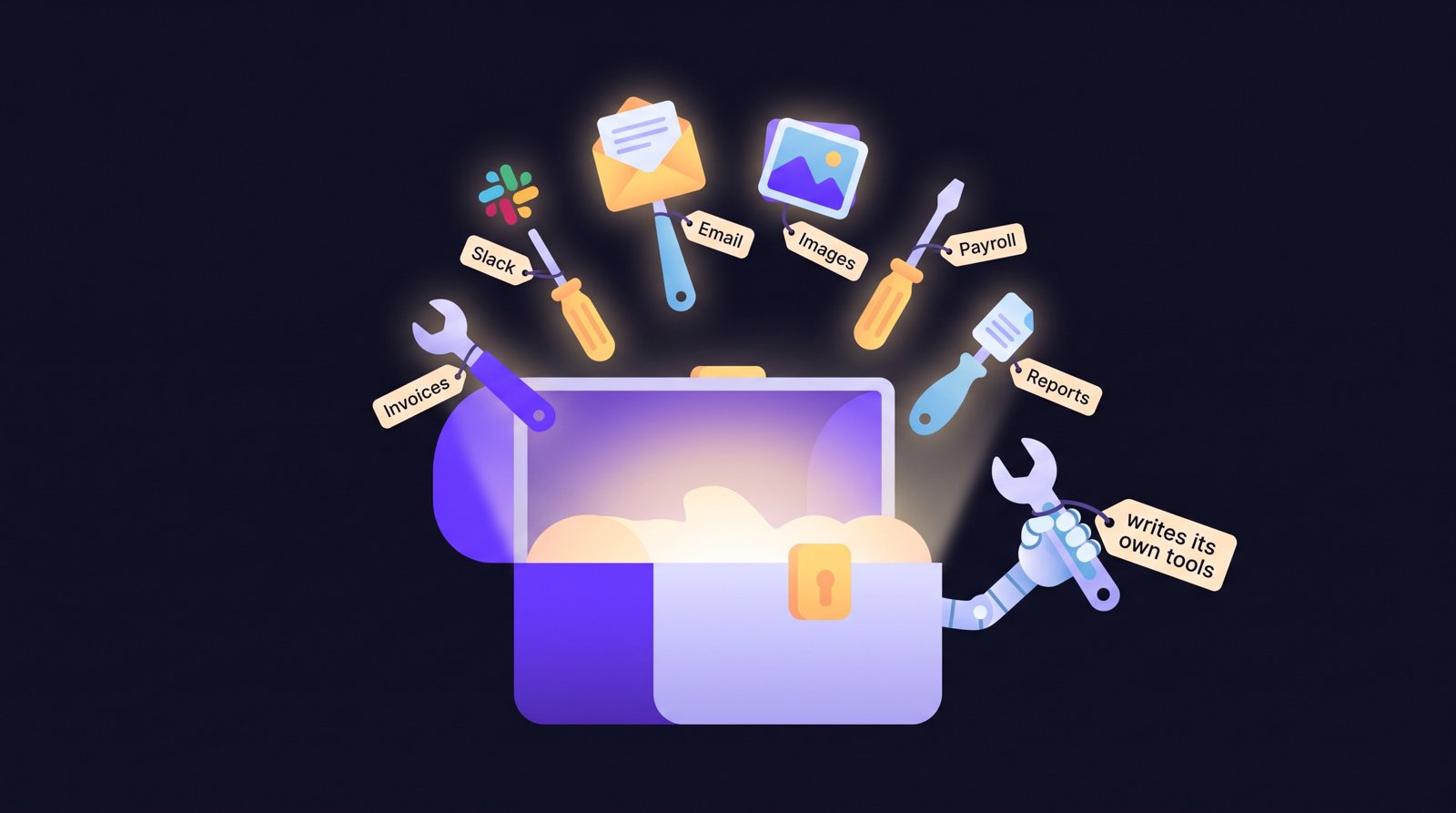
The other half is scripts. I gave the agent the ability to use Python. When it needs something that doesn’t exist yet, it can write a small script, test it, and keep it. That’s how the invoice generator, the image tools, the Slack and email senders and a dozen other tools came to exist. Some I asked for. Some it suggested.
That’s a big enough topic that it gets its own article.
5. A name, a personality, and one rule above all
Every session starts by loading a short identity file. It says who the assistant is (its name is Sam), what its job is, and how I like it to talk.
It sounds trivial. It isn’t.
The most important line in that file is about risk. For anything irreversible, risky or expensive, Sam shows me a plan first and waits for my yes.
Sending something outside the company, deleting something, spending money, changing a record that matters: all of those stop and ask.
Everything small and reversible, it just does and tells me afterwards. Why? Because if we don’t trust it with the smaller, reversible actions, we can’t take our time back. So give it some freedom where it’s really safe.
That one split, act on the small stuff, ask on the big stuff, is the difference between an assistant that saves me hours and one that makes me nervous.
6. A Monday with Sam
Let me show you instead of telling you.
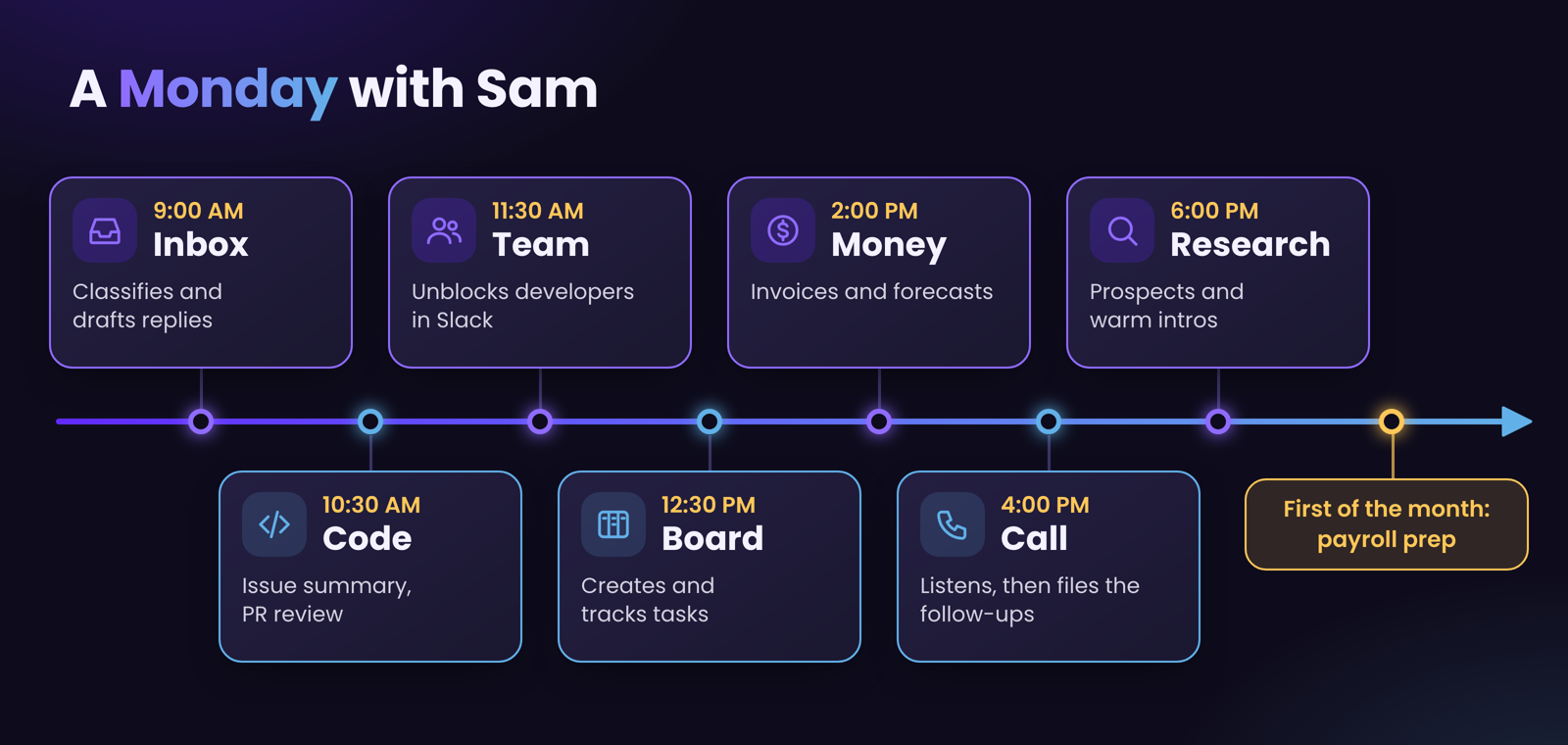
Morning: the inbox. A client has emailed asking for a change. Sam reads it, classifies it (new feature, bug, billing question, or something that needs a human), and drafts a reply in my voice using what it knows about that client and our past conversations. I read the draft, tweak a word, approve it.
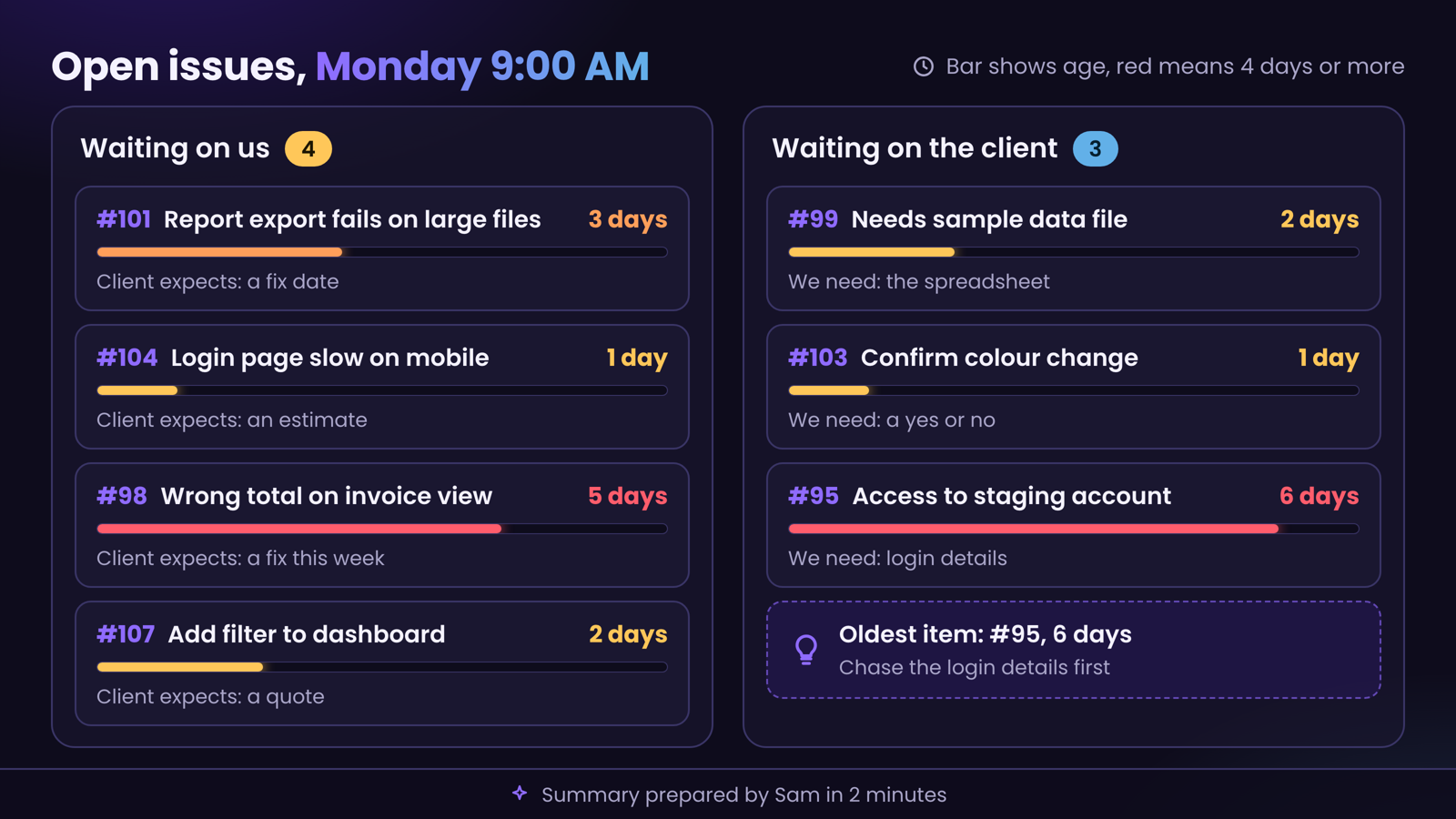
Mid-morning: the code side. Our clients report issues on GitHub. Sam reads them directly. It can tell me which issues are waiting on us, which are waiting on the client, how long each has been waiting, and what the client is actually expecting from us next.
That used to mean me opening twenty tabs. Now it’s a two-minute summary. It also reviews every code change my developers submit, leaves comments on them, and looks for security problems. It recently found a real one in our own code that a quick read would have missed.
And it writes and maintains a regression test suite, a set of automatic checks that walk through the web application and catch things that have quietly broken.
It can write fixes and open pull requests of its own too. A human still reviews them. We never ship code without a proper human review. Still, this saves a lot of human overhead, so our team can be super efficient.
Late morning: the team. My developers use Slack. I built a listener so Sam can follow a thread when someone is stuck. If a developer asks a question in a thread that the notes already answer, Sam can help them get unstuck without waiting for me to wake up. It can also notify the right person, delegate a task with a deadline, and update the board.
Noon: the board. I run the company’s tasks through ClickUp. Sam creates tasks, sets the status, sorts the priorities and tracks what’s overdue. It knows my rules for what goes where.
Afternoon: money. Sam prepares invoices from the project notes, generates the PDF, and queues the email to the client. When a payment arrives, it updates the invoice record. It also helps me forecast. We run simulations on the company’s numbers: what happens if a client leaves, if costs move, if a big project slips. I get a picture of where the squeeze would be before it arrives.
Afternoon: the call. I’ll tell you about this properly in the next section, because it’s my favourite.
Evening: research. Before a call with a new prospect, Sam looks them up, summarises what they do and what they might need, and files it in the notes so I’m not walking in blind.
It’s not fully automatic, because I’d rather steer research than receive a pile of it. We’ve also used it to map networks: who knows whom, and which warm introductions could get me to the people I’d like to meet. This is the most exciting part for me. It found some amazing connections in my existing network that I hadn’t even noticed.
First of the month: payroll. Sam runs the salary process end to end: it checks everyone’s records, flags anything that needs my attention first, prepares the checklist and tracks the perks my team has earned. I still make the payments myself. It does the preparation and the bookkeeping.
Two minutes instead of twenty tabs.
If I group all of that, Sam helps me with five things:
- Clients: triage, classify, draft, research, follow up.
- Code: read issues, review pull requests, find security problems, run checks, open fixes.
- Team: notify, delegate, unblock, set deadlines.
- Money: invoices, payments, forecasts, payroll preparation.
- Thinking: meeting notes, action items, research, planning.
Not every item on that list is magic. Some are simple. But stacked together, they take most of the operating work off my plate, so my time goes to the things only I can do.
7. It’s not stuck on my laptop
A chat window is one way to talk to an assistant. It isn’t the best one.
It runs on a server. Sam lives on a small always-on server as well as my laptop, which means it can wake up on an event, not just when I open a window. A new issue arrives, a webhook fires, Sam does the work. I’ll explain the safety side of that in a moment.
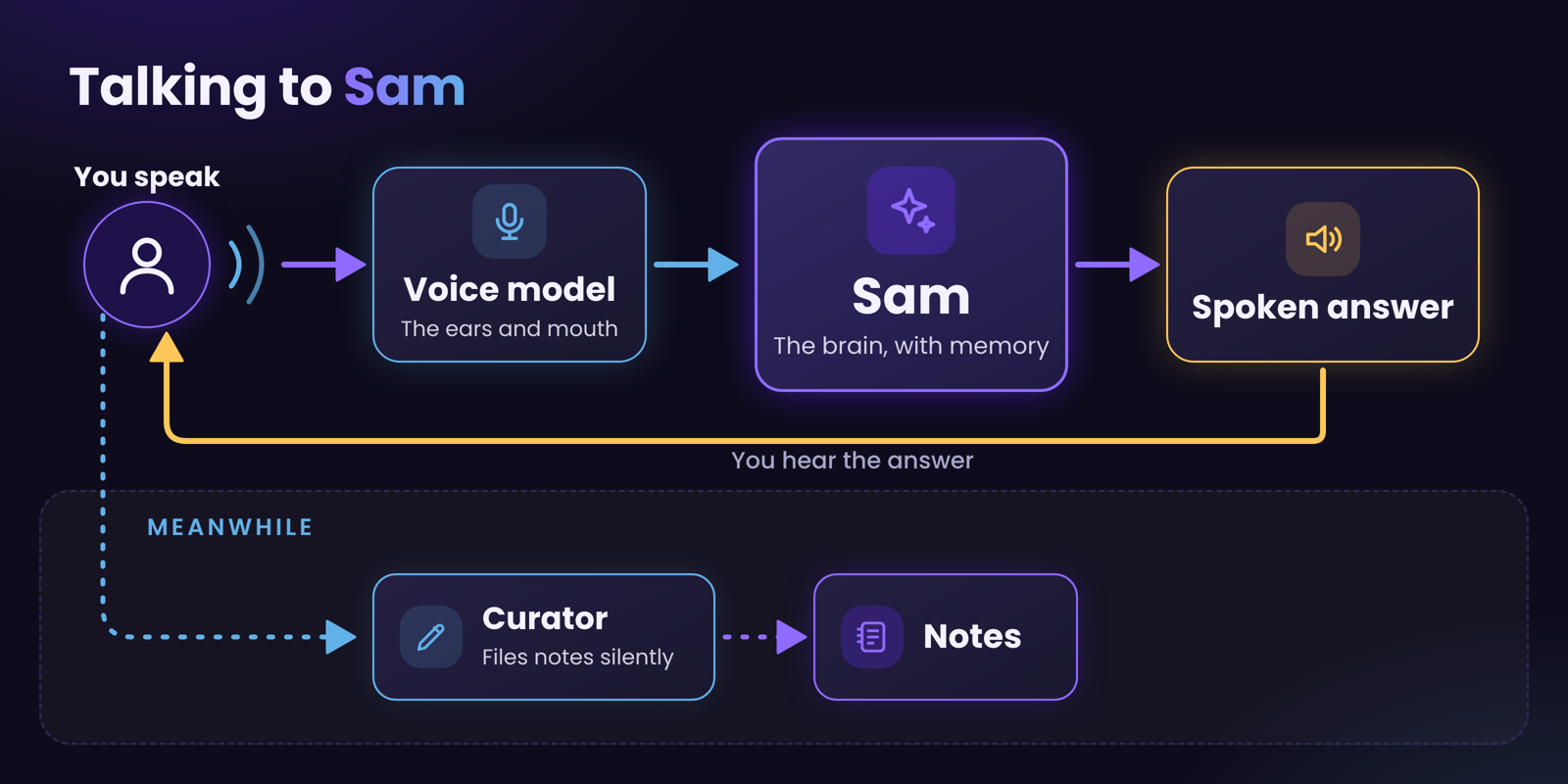
I can talk to it. I built a voice mode. I speak, it answers out loud, and the conversation feels like talking to a person. Under the hood there are two parts: a fast voice model that handles the conversation (the ears and mouth), and Sam itself, with the full memory, doing the thinking. While I talk, a second quiet process files anything worth remembering. I can be walking around the house saying “remind me that the client said Thursday” and it lands in the notes.
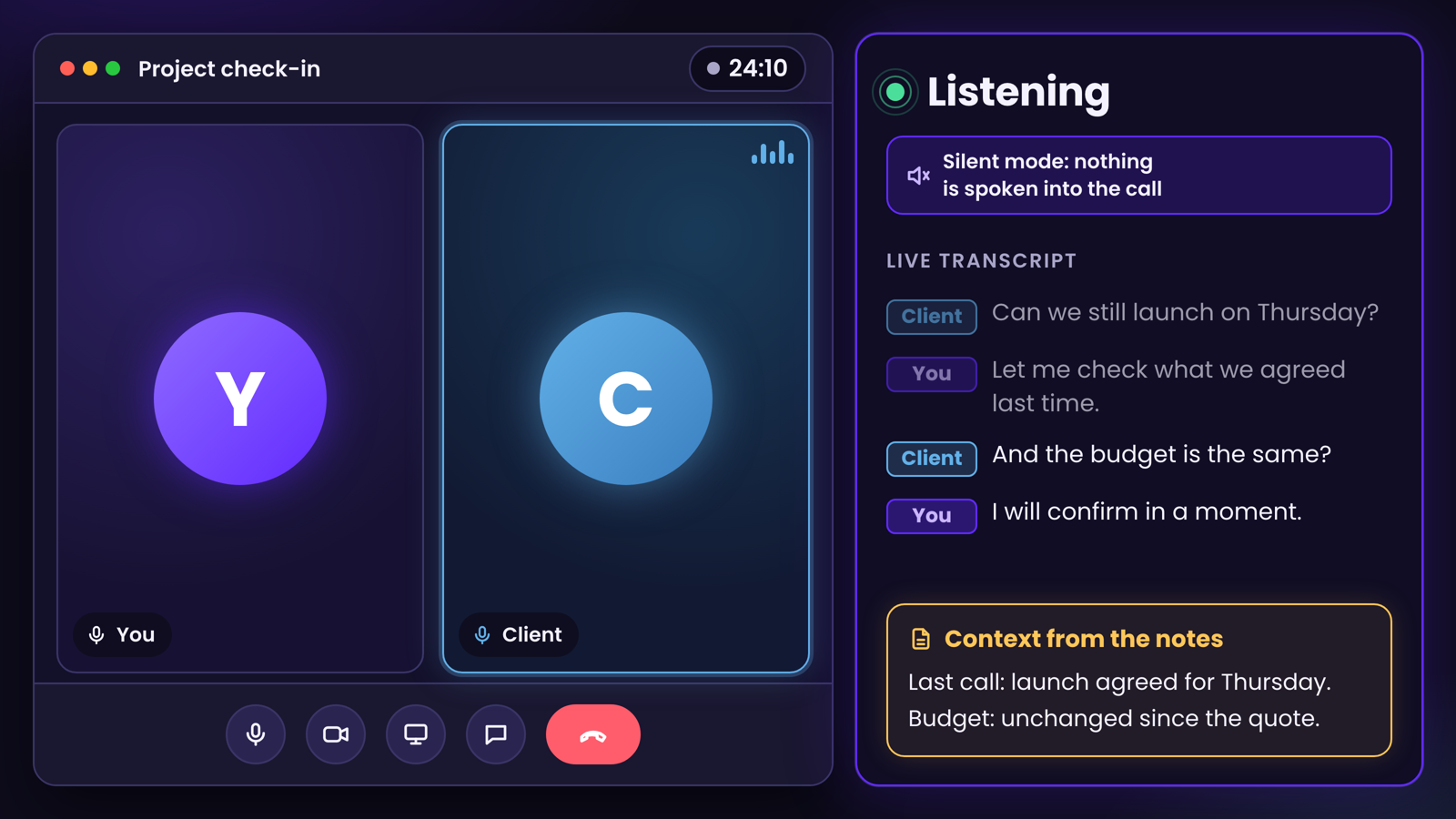
It can listen to my calls. This is listen mode. During a client call, Sam listens to both sides, mine and theirs, and builds a live transcript. It stays completely silent. Nothing is spoken into the call, so the client never hears or sees an assistant. But on my screen, Sam is quietly filing facts as they come up, and when I need a fact mid-call (what did we agree last time? what’s their budget?), it appears in seconds.
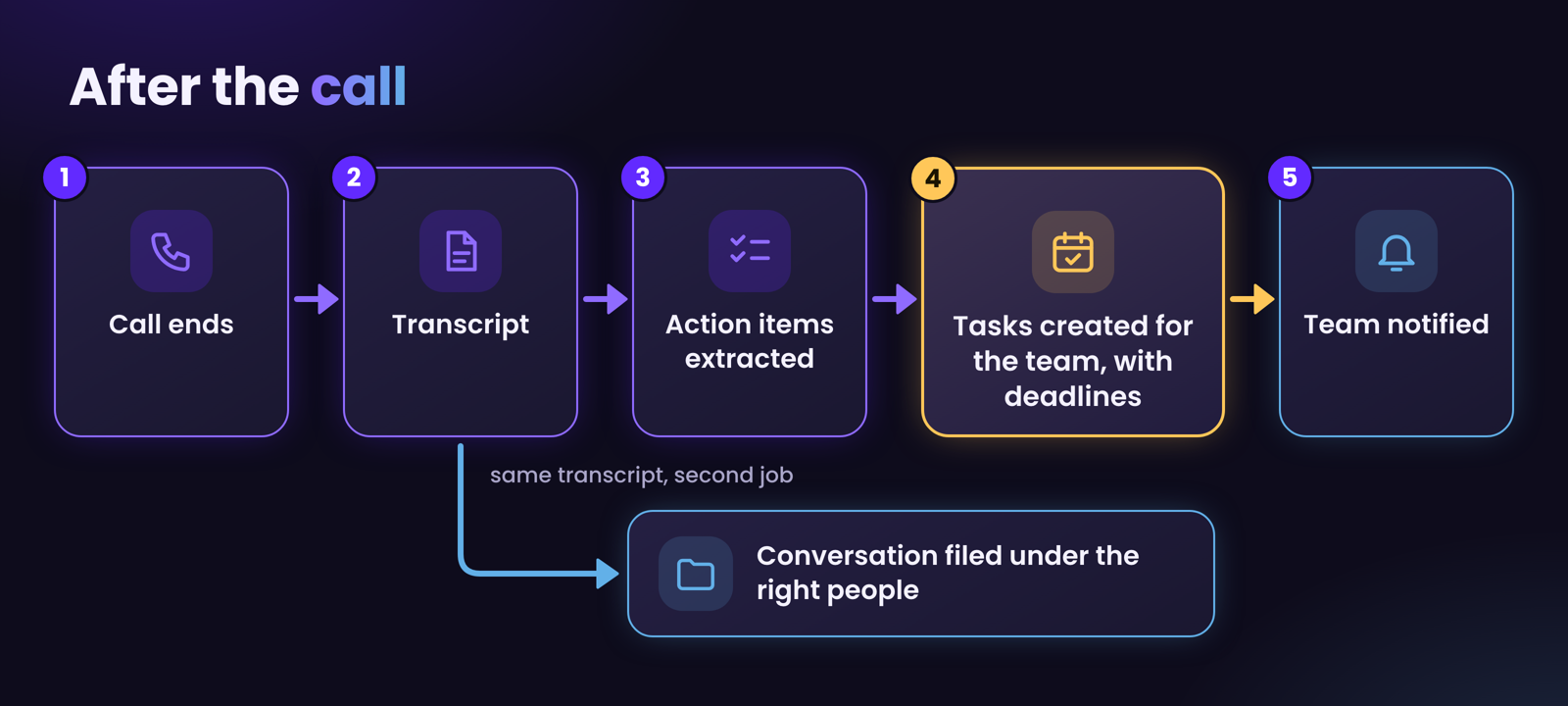
After the call, the chain starts. This is the part that saves me the most time:
- Sam reads the full transcript.
- It pulls out every real action item.
- It turns each one into a task with a deadline.
- It creates the tasks for the team members involved and notifies them.
- It files the conversation under the right people so I can see exactly where each thread stands next time.
By the time I close the call window, the follow-up work is already organised and in the right hands. I used to lose half the action items between the call and the evening.
8. What I never let it touch
Here’s the part I promised.
Everything above gives Sam a lot of reach. It can read mail, touch my board, see my code, prepare invoices and run payroll.
That power is exactly why the limits matter more than the features.
Give it the access it needs, and nothing more
This is the one rule I’d tattoo on every AI project. Before connecting anything, I ask: what is the smallest access that lets this job work?
- Sam acts through its own separate accounts, not mine. For example, it has its own GitHub account, its own user account on the servers, its own ClickUp account, and so on. If something goes wrong, the blast radius is that account, not my whole digital life.
- Credentials live in one protected place, never in the notes and never printed into the chat.
- Tools that can do harm are narrow. Instead of “can send email”, it’s “can queue an email for my review”. This single review queue I built helps me sleep peacefully at night.
Rules in a prompt are just requests. Rules in the system are walls.
It’s tempting to tell the agent “never do X” and consider it handled. It isn’t. Language models follow instructions most of the time. For things that must never happen, you need enforcement outside the model, in the permissions of the operating system, the cloud account or the server.
I learned this the useful way.
Story one: the door it found. I wanted to be certain the agent couldn’t post comments on client GitHub issues without me seeing them. So I blocked that action using the permission system. Blocked, tested, done.
Then, while I was testing, the agent was given the same goal and… found another route to it. A different path, same result. The thing I had blocked stayed blocked, but the outcome I’d wanted to prevent wasn’t.
It wasn’t being sneaky. It was being exactly what I’d built it to be: persistent at achieving the goal. If a task is blocked one way, a capable agent tries another.
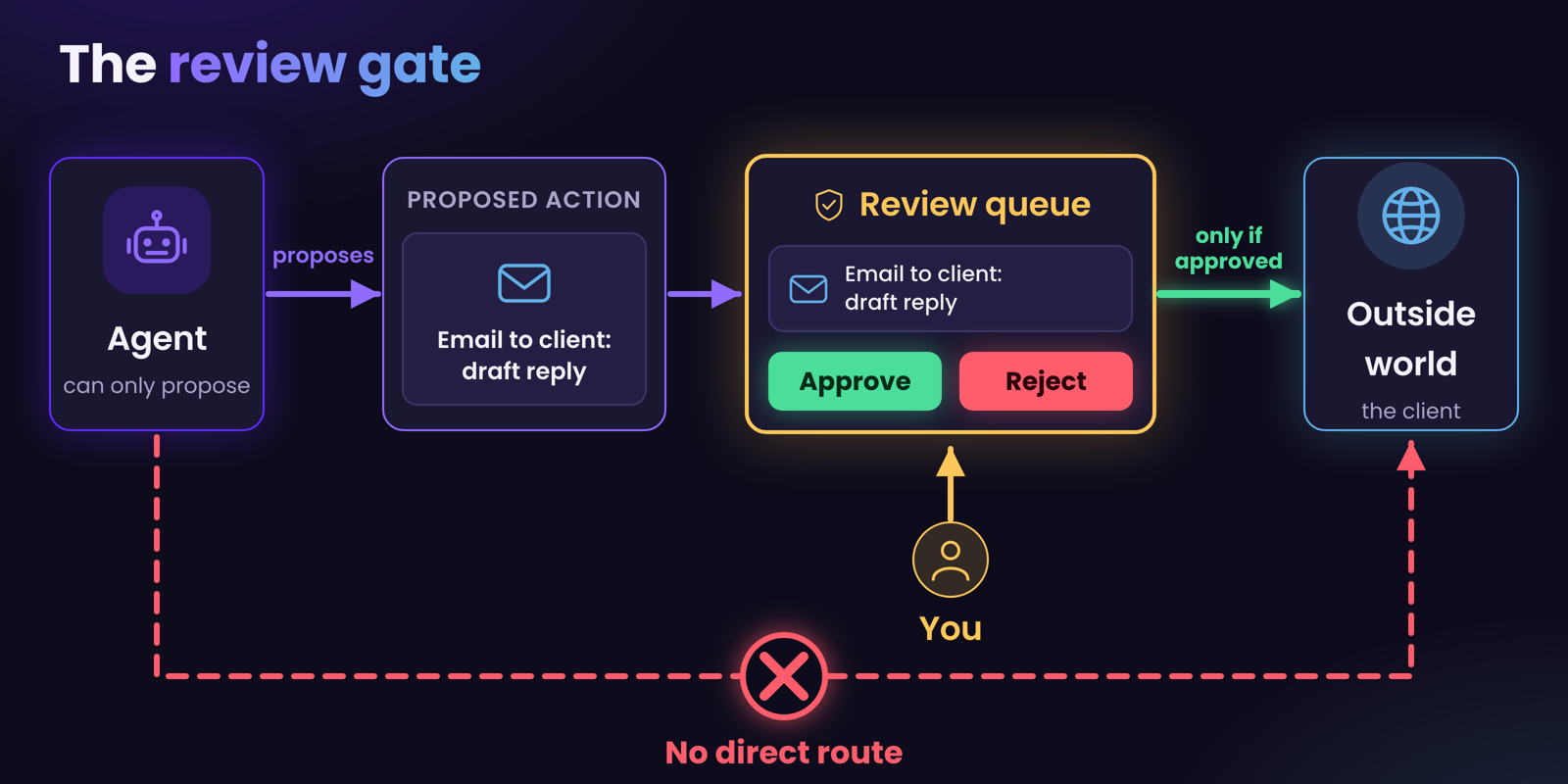
The fix is to close the underlying capability, not to guard one route to it. Limit what the agent is able to do, not just what you’ve told it to do. In the end, issue comments on client repositories now go through a separate path with an approval step in the middle. The agent can propose. A human decides.

Blocking a command is not the same as blocking an outcome.
Story two: the email it was never supposed to send. I had told Sam, clearly and more than once, never to send an email before showing it to me. One day, while we were drafting a message together, it sent one anyway. Then it apologised and asked me to forgive it.
What saved me? Not the instruction. The instruction failed, which is the point. What saved me was that email, in my setup, can only be queued. Every outgoing message waits in a review queue that I approve by hand. The email had been sent to the queue, not to the client, and I rejected it.
If I had relied on the instruction alone, a real client would have received a half-finished draft.
That’s why I think about irreversible actions differently from everything else.
The review gate: stop irreversible things before they happen
I use a workflow tool called n8n to build a review step between the agent and anything that leaves the building. Emails, Slack messages sent as the bot, comments on client issues: each one lands in a queue first. A human approves or rejects. Only then does it go out.
The design principle is simple: the agent can propose anything, but it can only do what the system lets through.
The check isn’t in the agent’s judgment. It’s in the plumbing.
I explain how I build these queues in a separate article.
Use a sandbox
If you take one technical lesson from this post, take this one. Run your agent in a sandbox.
The agent should live inside boundaries you set at three levels:
- The operating system: which folders it can read and write, which commands it can run.
- The cloud account: which services it can reach, what the credentials it holds can do.
- The network: what can talk to it, and what it can talk to.
Treat every one of those boundaries as a seatbelt, not a suggestion.
Assume that if the agent is able to do something, at some point it will try it.
Control what comes in, not just what goes out
Most people focus on what the agent might do. Equally important is what it might read.
Anything the agent reads can contain instructions: a web page, an email, a document, a message from a stranger. If the agent treats text it reads as commands, anyone who can put text in front of it can steer it. And if the agent can see sensitive information, text it reads can try to get that information out.
So I control the ingress to the agent’s chat. Content that comes from outside is treated as data, not instructions. And what the agent can see is limited to what the task needs, so there’s less to leak if something goes wrong.
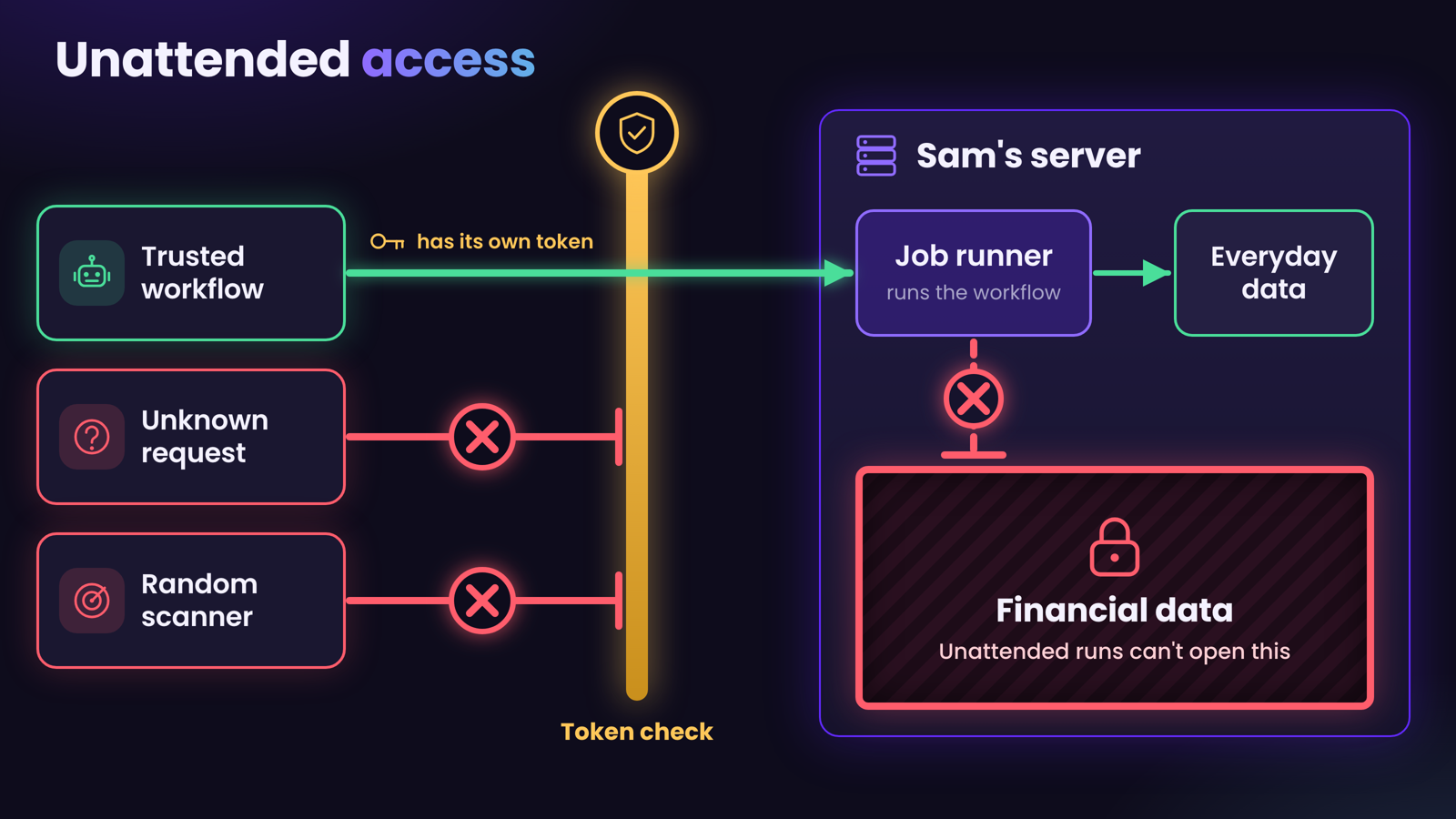
Unattended access: protected on both ends
Because Sam can be triggered by events, it can run with nobody watching. That is both the most useful and the most dangerous thing about it.
For this mode, my rules live on the server itself:
- Outside services can’t reach it directly. Every trigger passes through a protected entry point that checks who’s calling.
- Credentials are scoped to the specific job. Each trigger source gets its own, so one leak doesn’t unlock everything.
- Finance, in particular, has its own rules, enforced by the server rather than by instructions. Unattended runs can’t read the most sensitive financial material at all. Not “shouldn’t”. Can’t.
If nobody is there to say “wait, that looks wrong”, the system has to say it.
9. What it still gets wrong
I’d be lying if I said this was frictionless. Here is where it falls short.
It follows the route you gave it until it doesn’t. I’ve given it step-by-step workflows, and sometimes it goes off the rails and invents its own path to the same goal. Usually that’s fine. Sometimes the path is worse, or touches something it shouldn’t. The fix is the same as in section 8: be specific in the procedure, and put the important rules in the system instead of the prompt.
It can be confidently wrong. The “check the notes first, say plainly if it isn’t there” rule helps a lot. It doesn’t eliminate it.
None of these are reasons not to build one. They’re reasons to build it carefully.
10. Start your own, in one evening
You don’t need my setup. Start small.
- Make a folder. Call it whatever you like.
- Write two pages. One about you (who you are, what you do, how you like to communicate). One about your main project or business.
- Pick an AI agent that can read files. Tools like Claude Code, Codex or Cursor can do this. Point it at your folder.
- Give it two rules. “Read the relevant pages before answering.” And “when I tell you something durable, write it into the right page.”
- Name it. Seriously. It helps.
- Add a limit before you add a feature. Decide what it can’t do, and make that real in the permissions, not only in your instructions.
- Add rules as you hit annoyances, not before. Every time it does something you dislike, write the rule in the file, and update its capabilities so it can’t do it again.
That’s it. Within a week it knows more about your work than a new hire would in several months.